Drag to rotate · Scroll to zoom · Right-click to pan
1 / 18
⬡bar
⬡bodemPlaat
⬡c1
⬡c2
⬡c3
⬡c4
⬡c5
⬡c6
⬡cT
⬡feet
⬡pin
⬡pinOut
⬡pinSmall
⬡testBodem
⬡zimaBarLo…
⬡zimaBarSh…
⬡zimaBoard
⬡zimaDisk
Description
# Mecano Modular Enclosure System
A parametric modular enclosure system designed with **PythonSCAD**.
The goal of this design is to create open and customizable enclosures by connecting different printed parts together using mechanical connectors. Similar to a construction system, walls, corners, base plates and extensions can be combined to build enclosures of different sizes and shapes.
## Features
- Parametric 3D printable enclosure components
- Modular connector-based construction
- Create open frames and housings without redesigning the complete model
- Connect walls, corners and plates together
- Designed for easy modification in PythonSCAD
- Suitable for electronics projects, SBCs, storage boxes and custom housings
## Concept
The enclosure is built from separate printable elements:
- Base plates
- Connector blocks
- Wall sections
- Corner pieces
- Support bars
- Locking pins
Instead of printing one large enclosure, the parts are connected together after printing.
This makes it possible to:
- Change enclosure dimensions
- Replace individual parts
- Create unusual shapes
- Reuse the same connector system for multiple projects
## Connector System
The core of the design is the connector.
Each connector provides a mechanical interface that allows multiple parts to be joined together.
Connectors can be oriented in different directions:
- Horizontal connections
- Vertical connections
- Corner connections
- Multi-way junctions
The connector geometry is designed to allow parts to slide together while maintaining a stable connection.
Small tolerances are included to compensate for typical FDM 3D printing differences.
## Dependencies
You should have installed the **mhlib** library in a mhlib subfolder in your libraries folder. Also on pyforge available.
## Printed Parts
### Connectors
Connectors form the building blocks of the system.
Examples:
- Single connector
- Multi-direction connector
- Corner connector
- Cross connector
### Bars and Walls
Bars are structural elements used to connect two points.
They can be used as:
- Side walls
- Frame elements
- Structural supports
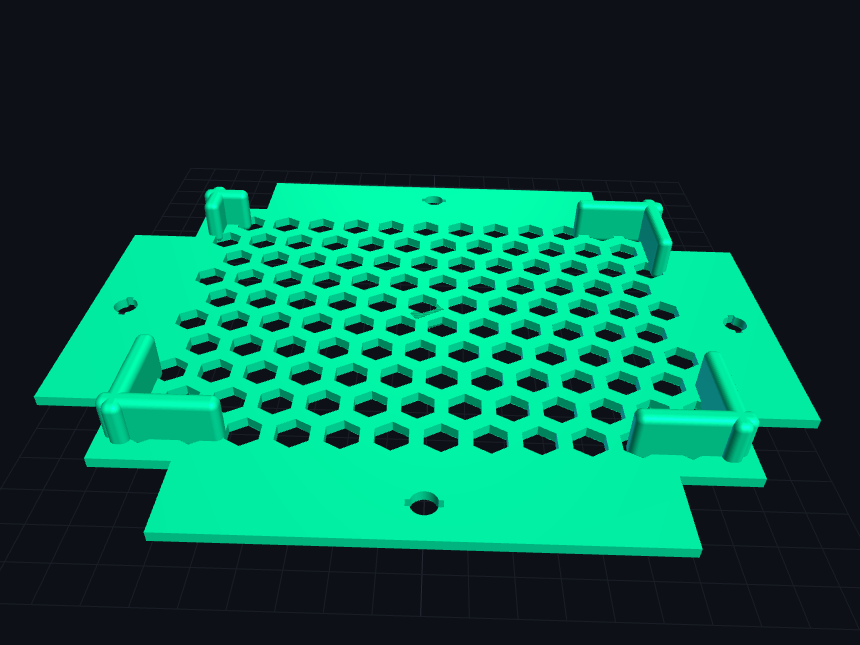
### Base Plate
The base plate provides a starting point for an enclosure.
The plate includes:
- Integrated connector positions
- Optional open honeycomb-style bottom
- Mounting possibilities
Example:
```python
print_bodemPlaat(x=180, y=120)
```
## Parameters
Main design parameters:
| Parameter | Description |
|---|---|
| wall | Wall thickness |
| width | Connector base width |
| tol | Printing tolerance |
| wallHeight | Default wall height |
| plateSpacing | Distance between generated parts |
Example:
```python
wall = 3
width = 15
tol = 0.4
```
These values can be adjusted for different printers and materials.
## Printing Recommendations
Recommended settings:
- Material: PLA, PETG or ABS
- Layer height: 0.2 mm
- Infill: 15-30%
- Walls: 3 or more
Accurate printing is important because the system relies on mechanical connections.
If connectors are too tight:
- Increase `tol`
If connectors are too loose:
- Decrease `tol`
## Assembly
Typical assembly workflow:
1. Print required connectors
2. Print base plate
3. Insert connector pieces
4. Add walls or bars
5. Secure using pins if required
No glue is required for normal use.
## Customization
The design is fully parametric.
You can create new enclosure sizes by changing:
- Plate dimensions
- Wall dimensions
- Connector positions
- Number of corners
- Number of sides
The PythonSCAD functions can also be reused to create new designs.
## PythonSCAD Usage
Open:
```text
mecano.py
```
Select the part to generate using the `run` parameter.
Example:
```python
run="connector"
```
or:
```python
run="bodemPlaat"
```
The script can export printable 3MF files automatically.
## License
License: TBD
## Author
Matthieu Hendriks
Created with PythonSCAD.
💬 Discussion 0 comments